The Meshy API - Build 3D Generation Into Anything
A complete, practical guide to Meshy's REST API: how to create your API key, every endpoint you can call, exactly what each request costs in credits, how the free test mode works, and working quickstart code in cURL, Python, and JavaScript - plus the plugins, MCP server, and videos that round out the developer ecosystem.
# create a text-to-3D preview task curl https://api.meshy.ai/openapi/v2/text-to-3d \ -H "Authorization: Bearer $MESHY_API_KEY" \ -H "Content-Type: application/json" \ -d '{ "mode": "preview", "prompt": "a weathered bronze pirate compass", "art_style": "realistic" }' # → response { "result": "0193-8b2a-task-id" } # 20 credits
What is the Meshy API?
The Meshy API is a REST interface to the same generation engine that powers the Meshy web app - text-to-3D, image-to-3D, texturing, rigging, animation, and a growing set of utility and 3D-printing endpoints - exposed so you can wire 3D asset generation directly into your own product, game pipeline, or automation.
Everything on Meshy's platform that a human does by clicking, the API does with an HTTP request. You POST a task (a prompt, an image, or a model to transform), receive a task ID immediately, then poll the task - or register a webhook - until generation completes and the response contains download URLs for your model in formats like GLB, FBX, OBJ, and USDZ. That asynchronous task pattern is the heart of the whole API: generations take seconds to minutes, so nothing blocks, and your application stays responsive while Meshy's GPUs do the heavy lifting.
Who actually builds on it? Four groups keep coming up. Game studios batch-generate prop libraries and pipe them through the Remesh endpoint into engine-ready topology. App developers embed "describe it, get a 3D model" features in consumer products - avatar makers, AR shopping, virtual worlds. 3D-printing platforms use the printability analysis and repair endpoints to turn AI output into physically printable parts; Meshy ships integrations for Bambu Studio, OrcaSlicer, Creality Print, Cura, and more. And increasingly, AI agents call Meshy as a tool: the official MCP server lets Claude Code, Cursor, Windsurf, and other MCP-compatible assistants generate 3D assets mid-conversation, and the docs even publish an llms.txt file so plain chat agents can read the API surface.
Commercially, the API is a separate, pay-before-you-go product from Meshy's web subscriptions. You top up an API credit wallet in advance, and each call deducts a published credit price - there is no monthly API fee, no minimum, and no charge while idle. Your web subscription tier still matters at the edges (it gates API Playground access and how long API-generated assets are retained), but API spending itself is entirely usage-based. We break the full price list down below.
Every endpoint in the Meshy API
The API surface splits into three families: core generation endpoints that create or transform 3D content, utility endpoints that prepare assets for production, and the playful Creative Lab endpoints aimed at 3D-printable consumer objects.
Text to 3D
Two-stage flow: a preview call generates the mesh from your prompt, then a refine call textures it. The workhorse endpoint for prompt-driven pipelines.
20 cr preview · 10 cr refine (Meshy-6)Image to 3D
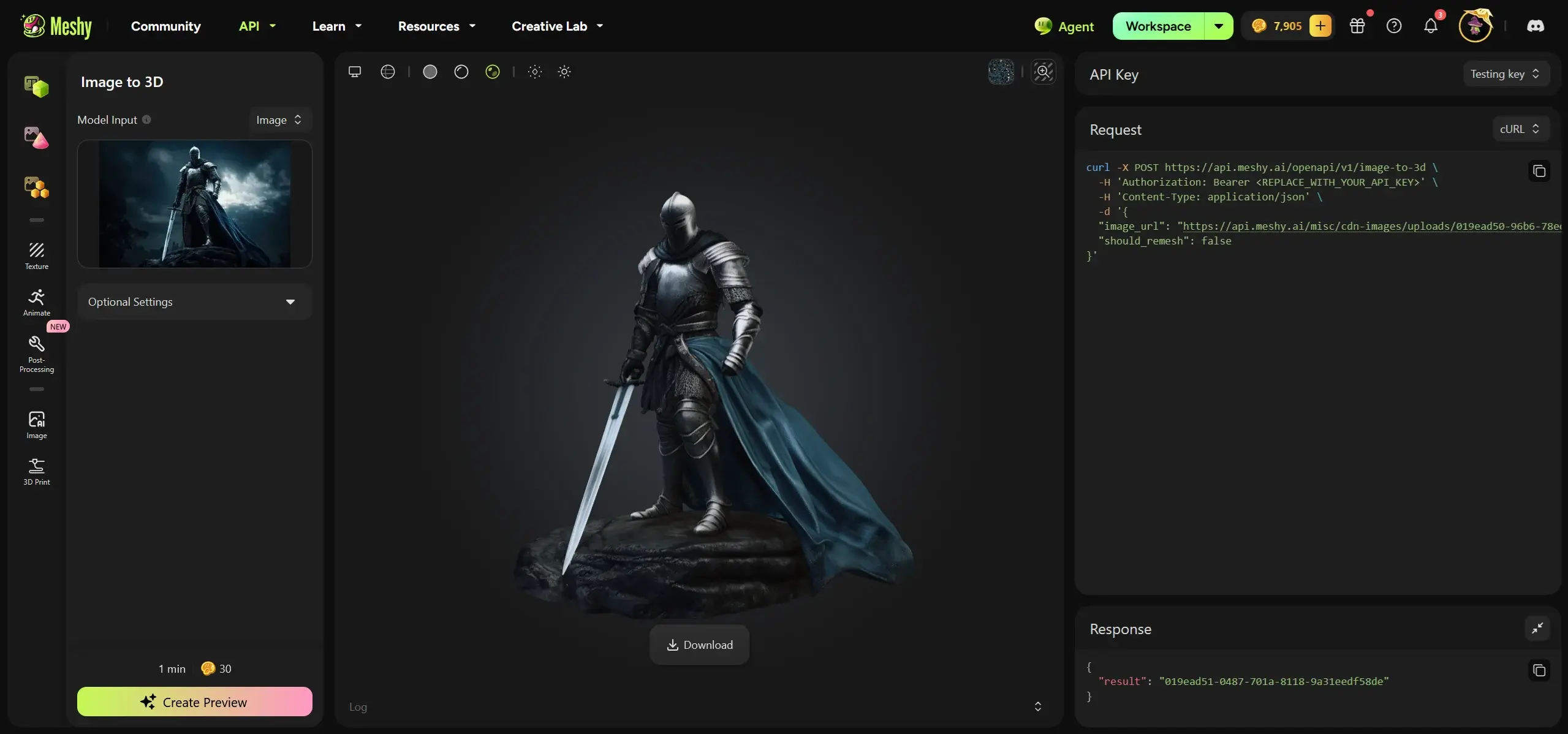
Lifts a single reference image into a full 3D model, with or without textures. Ideal for concept-art-to-asset workflows.
20–30 cr (Meshy-6)Multi Image to 3D
Feeds several views of the same subject for tighter geometric fidelity than a single image can give.
20–30 cr (Meshy-6)Retexture
Re-skins an existing model with a new text-driven texture pass - change material, palette, or style without regenerating geometry.
10 crText to Image / Image to Image
2D generation endpoints (nano-banana and gpt-image model families) for concept art and texture references inside the same wallet.
3–12 cr by modelRigging & Animation
Auto-rig a humanoid mesh, then apply animations from Meshy's motion library - straight to game-ready, moving characters.
5 cr rig · 3 cr animationRemesh
Retopologizes a model to target polycounts and formats - the step that turns raw AI output into engine-friendly geometry.
5 crConvert & Resize
Cheap format conversion (GLB ⇄ FBX ⇄ OBJ ⇄ USDZ…) and dimension changes for pipeline glue.
1 cr eachBalance
Returns your remaining API credit balance - poll it to drive top-up alerts in production systems.
free3D Print suite
Multi-color print prep, printability analysis (free), and automatic printability repair for physical manufacturing flows.
0–10 crKeychain · Fridge Magnet · Figure · Lamp
Templated consumer-object generators with a cheap prototype call and a full-quality build call - designed for print-on-demand products.
6 cr prototype · 20–30 cr buildWebhooks
Register HTTPS callbacks and Meshy notifies you on task completion - no polling loops in production.
freeGetting and using your Meshy API key
Every request to the API authenticates with a bearer token - your API key. Creating one takes under a minute, and Meshy even ships a dummy key so you can integrate before spending a single credit.
Create a Meshy account
Sign up free at meshy.ai - no credit card needed. The API key system is available to every account, though you'll need to purchase API credits before real generations run.
Open the API settings page
Navigate to meshy.ai/settings/api (Profile → Settings → API). This page is where keys are created, named, revoked, and where API credit top-ups are purchased.
Generate a key
Click to create a new key. Meshy keys follow the format msy-<random-string>. Copy it immediately and store it somewhere secure - treat it like a password.
Authenticate your requests
Send the key in the Authorization header of every call: Authorization: Bearer msy-your-key. That's the entire auth model - no OAuth dance, no signing, no session tokens.
Top up API credits
Buy API usage from the same settings page before making billable calls. The API wallet is separate from your web subscription's monthly credits.
The free test mode key
During development you can skip billing entirely with Meshy's published test key: msy_dummy_api_key_for_test_mode_12345678. It works against every endpoint, consumes zero credits, and returns realistic sample responses - perfect for wiring up your task-polling logic, webhook handlers, and error paths before pointing the integration at a real key. Build against test mode first; swap in your production key as the final step.
Key security best practices
API keys are billing credentials: anyone holding yours can drain your credit balance. Keep keys in environment variables or a secrets manager, never hardcoded or committed to a repository; call Meshy from your backend, never directly from browser or mobile code where the key would be visible to users; rotate keys if a leak is even suspected, and revoke unused ones; and use separate keys per environment so a compromised staging key can be killed without touching production. If you're shipping a consumer app, put a thin proxy between your clients and Meshy - your server holds the key, applies your own rate limits, and forwards sanitized requests.
Your first 3D model in three requests
The canonical first integration is Text to 3D: create a preview task (mesh), refine it (texture), and download the result. Here's the full loop in Python - the same pattern applies to every generation endpoint.
import requests, time, os API_KEY = os.environ["MESHY_API_KEY"] # or the free test-mode key HEADERS = {"Authorization": f"Bearer {API_KEY}"} BASE = "https://api.meshy.ai/openapi/v2/text-to-3d" # 1) create the preview (mesh) task - 20 credits on Meshy-6 task = requests.post(BASE, headers=HEADERS, json={ "mode": "preview", "prompt": "a weathered bronze pirate compass, ornate engravings", "art_style": "realistic", }).json() task_id = task["result"] # 2) poll until the mesh is ready while True: status = requests.get(f"{BASE}/{task_id}", headers=HEADERS).json() if status["status"] in ("SUCCEEDED", "FAILED"): break time.sleep(5) # 3) refine (texture) the mesh - 10 credits refine = requests.post(BASE, headers=HEADERS, json={ "mode": "refine", "preview_task_id": task_id, }).json() # final status payload includes model_urls: {glb, fbx, obj, usdz…}
const BASE = "https://api.meshy.ai/openapi/v2/text-to-3d"; const HEADERS = { Authorization: `Bearer ${process.env.MESHY_API_KEY}`, "Content-Type": "application/json", }; const { result: taskId } = await (await fetch(BASE, { method: "POST", headers: HEADERS, body: JSON.stringify({ mode: "preview", prompt: "low-poly desert cactus" }), })).json(); // poll GET `${BASE}/${taskId}` until status === "SUCCEEDED", // or skip polling entirely by registering a webhook.
Three habits make integrations production-grade from day one. Prefer webhooks over polling once you're past prototyping - register a callback URL and Meshy pushes task completions to you, eliminating wasted requests. Respect rate limits: the API enforces per-key request limits (documented on the rate-limits page), so add exponential backoff on 429 responses rather than hammering retries. And download and store your assets promptly: API asset retention is finite on self-serve tiers - model URLs aren't a permanent CDN - while Enterprise contracts include forever retention. Treat Meshy as the generator and your own storage as the source of truth.
Meshy API pricing - every call, in credits
The API is pay-before-you-go: you purchase API credits in advance from the API settings page, and each call deducts a fixed price. There's no subscription required for the API itself, no monthly minimum, and unused API credits don't expire on a monthly cycle the way web-plan credits do. Volume pricing and custom contracts are available through sales.
| API | Price per call |
|---|---|
| Text to 3D (Preview) - mesh generation | 20 credits Meshy-6 & low-poly models · 5 credits other models |
| Text to 3D (Refine) - texture generation | 10 credits |
| Image to 3D | Meshy-6 & low-poly: 20 cr (no texture) / 30 cr (textured) · other models: 5 / 15 cr |
| Multi Image to 3D | Meshy-6: 20 cr (no texture) / 30 cr (textured) · other models: 5 / 15 cr |
| Retexture | 10 credits |
| Remesh | 5 credits |
| Convert | 1 credit |
| Resize | 1 credit |
| Auto-Rigging | 5 credits |
| Animation | 3 credits |
| Text to Image | nano-banana 3 cr · nano-banana-2 6 cr · nano-banana-pro 9 cr · gpt-image-2 9 cr |
| Image to Image | nano-banana 3 cr · nano-banana-2 6 cr · nano-banana-pro 9 cr · gpt-image-2 12 cr |
| 3D Print - Multi-Color | 10 credits |
| 3D Print - Analyze Printability | Free |
| 3D Print - Repair Printability | 10 credits |
| Creative Lab - Keychain / Magnet / Figure (prototype → build) | 6 cr → 20 cr |
| Creative Lab - Lamp (prototype → build) | 6 cr → 30 cr |
| Balance check, webhooks, task polling | Free |
Budgeting a real pipeline
Translate that table into a concrete workload: producing one fully finished, game-ready character on Meshy-6 costs roughly 20 (mesh) + 10 (texture) + 5 (remesh to target topology) + 5 (auto-rig) + 3 (animation) = 43 credits, plus a 1-credit conversion if your engine wants a different format. A static prop is closer to 30–35 credits textured and retopologized. If you're iterating - and you will be - budget 1.5–2× those figures to account for prompt revisions and regenerations. A pipeline that ships 100 finished props a month therefore needs roughly 4,500–7,000 API credits monthly, which is the scale at which Meshy's volume pricing via sales becomes worth a conversation rather than self-serve top-ups.
Notice the strategic detail in the table: non-Meshy-6 models cost a quarter as much (5 credits vs 20 for mesh generation). For draft-stage exploration - testing prompts, blocking out scenes, generating placeholder geometry - running the cheaper legacy models and reserving Meshy-6 for finals can cut a pipeline's credit burn dramatically. Likewise, the free Analyze Printability call means 3D-printing flows can validate every model at zero cost and only pay the 10-credit repair fee when something actually needs fixing.
"Meshy API free" and "API free download" - what's actually true
Two of the most-searched phrases around this API are "Meshy api free" and "Meshy api free download." Both deserve straight answers, because one has a genuinely useful answer and the other rests on a misunderstanding worth clearing up.
What you can genuinely do for free
Quite a lot, actually. The test mode API key (msy_dummy_api_key_for_test_mode_12345678) is the headline: it hits every endpoint, costs nothing, and returns realistic responses, so you can build and fully exercise an integration - task creation, polling, webhooks, error handling - before purchasing a single credit. Beyond that, creating an account and an API key is free, the documentation is fully public with no login wall, the Analyze Printability endpoint is free even in production, and balance checks and polling never bill. What does not exist is a free allocation of real generation credits on the API side - unlike the web app's 100 free monthly credits, production API calls require a purchased balance from the very first request. If you only need a handful of free generations to evaluate quality, do them in the web app on the free plan; the engine is the same one the API exposes.
Why there's no "API download" - and what people actually want
The Meshy API is a cloud REST service, not software. There is no installer, no binary, no offline package - requests go to https://api.meshy.ai and generation happens on Meshy's GPUs. Any site offering a "Meshy API free download" is either confused or distributing something you shouldn't run. What searchers usually mean falls into three legitimate buckets, all of which are downloadable: the engine plugins (Blender, Unity, Unreal, Godot, Maya, 3ds Max, Omniverse, Roblox bridges - free to install, authenticated with your account), the MCP server for AI coding assistants, and your generated model files themselves, which download as GLB/FBX/OBJ/USDZ from the URLs in completed task responses. If "download the API" meant "get the spec," that's free too: the docs publish the complete reference, including a machine-readable llms.txt.
Where the documentation lives
Everything official sits at docs.meshy.ai: the quickstart, authentication and error references, the pricing table reproduced above, rate limits, asset retention policy, webhooks guide, per-endpoint references with request/response schemas, the Creative Lab APIs, and installation guides for every plugin and 3D-printing integration. Two practical entry points: start at the Quickstart if you're writing code today, or at AI Integration if you'd rather let an MCP-equipped assistant write the integration for you.
Video walkthroughs of the Meshy engine the API exposes
The API returns exactly what the web app produces - same models, same texturing, same animation library. These independent walkthroughs are the fastest way to judge the output quality your API credits will buy.
Frequently asked questions
Quick answers to the questions developers ask most before integrating.
How do I get a Meshy API key?
Create a free account at meshy.ai, then open Settings → API (meshy.ai/settings/api) and generate a key. Keys use the format msy-<random-string> and authenticate via the Authorization: Bearer header on every request. Store it securely - it's a billing credential.
Is the Meshy API free to use?
Development is free; production isn't. The published test mode key hits every endpoint at zero cost with sample responses, so you can build your whole integration free. Real generations require pre-purchased API credits - there's no free production allocation on the API side. For free quality evaluation, use the web app's free plan, which runs the same engine.
How much does the Meshy API cost?
It's pay-before-you-go, priced in credits per call: 20 credits for a Meshy-6 mesh (text-to-3D preview), 10 for texturing/refine, 20–30 for image-to-3D, 5 for remesh or rigging, 3 for animation, 1 for convert/resize, and 3–12 for 2D image generation depending on model. Printability analysis, balance checks, polling, and webhooks are free. Volume contracts go through sales.
Is there a Meshy API download or SDK installer?
No - it's a cloud REST API at api.meshy.ai with nothing to install. What you can download: the free engine plugins (Blender, Unity, Unreal, Godot, Maya, 3ds Max, Omniverse, Roblox), the MCP server for AI assistants, and your generated model files (GLB, FBX, OBJ, USDZ) from completed task URLs. Avoid any site offering a "Meshy API free download" installer.
Where is the official Meshy API documentation?
At docs.meshy.ai - fully public, no login required. It covers the quickstart, authentication, errors, pricing, rate limits, asset retention, webhooks, every endpoint reference, the Creative Lab APIs, plugin guides, and an llms.txt for AI agents.
Does my Pro or Studio subscription include API credits?
No. Subscription credits power the web app; the API draws from a separately purchased, pay-before-you-go wallet. Subscriptions affect the API only at the edges: Pro and Studio include limited API Playground access, while Enterprise unlocks full API access and forever asset retention.
What's the test mode API key and what are its limits?
It's the literal string msy_dummy_api_key_for_test_mode_12345678. It works on all endpoints and consumes no credits, but returns sample/mock results rather than real generations - its job is letting you build and test request handling, polling, and webhooks before going live.
How does the task workflow actually work?
Every generation endpoint is asynchronous: you POST a task and instantly receive a task ID, then either poll GET on that ID until the status moves from PENDING/RUNNING to SUCCEEDED (or FAILED), or register a webhook and get notified. Successful tasks include download URLs for the generated files.
What 3D formats does the API return?
Completed tasks expose multiple format URLs - typically GLB, FBX, OBJ, and USDZ - and the 1-credit Convert endpoint handles further translation. That covers every major game engine, DCC tool, AR platform, and 3D-printing slicer.
Are there rate limits?
Yes - the API enforces per-key request limits, documented on the rate-limits page at docs.meshy.ai. Production code should treat 429 responses with exponential backoff, and high-throughput applications should discuss raised limits with sales as part of a volume contract.
How long does Meshy keep my API-generated assets?
Retention is finite on self-serve usage - Studio plans add API asset retention and Enterprise contracts include forever retention. The safe architecture regardless of tier: download completed models promptly and store them in your own infrastructure, treating Meshy URLs as delivery, not archival.
Can AI assistants like Claude or Cursor use the Meshy API?
Yes - Meshy ships an official MCP server giving tool-calling access from Claude Code, Cursor, Windsurf, and other MCP-compatible assistants, and publishes an llms.txt so plain chat agents can read the API surface. Pro and Studio plans also list "MCP & Skill for AI agents" among their features.
Can I use API-generated models commercially?
Paid Meshy users own their generated assets outright and can use, distribute, and sell them, provided their inputs didn't infringe others' rights. Since production API usage is inherently paid, API-generated assets fall under that ownership model - but review Meshy's current Terms of Use for the authoritative language before shipping a commercial product.
What are the Creative Lab endpoints for?
They're templated generators for 3D-printable consumer objects - keychains, fridge magnets, figures, and lamps - each with a cheap 6-credit prototype call and a full-quality build call (20–30 credits). They're aimed at print-on-demand and personalization products where you want consistent, printable output without prompt engineering.
Who should contact sales instead of self-serving?
Anyone whose monthly burn reaches thousands of credits, needs raised rate limits, wants forever asset retention, or requires contractual terms (SLAs, data retention, SSO). Meshy offers volume API pricing and custom contracts through its sales form - the self-serve wallet is priced for getting started, not for scale.